
 JSplitPane(分隔面板)
# 1. 概述
官方JavaDocsApi: javax.swing.JSplitPane (opens new window)
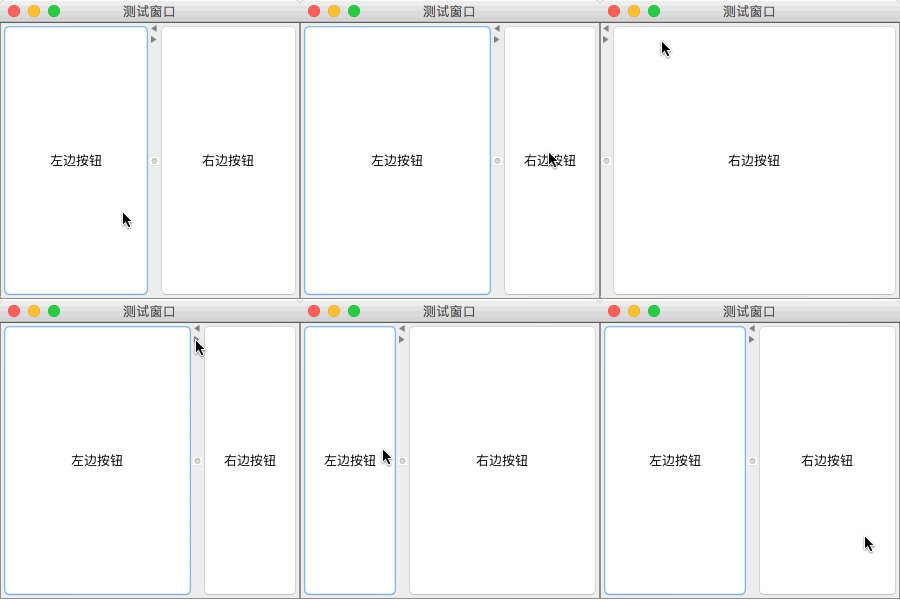
JSplitPane,分隔面板。JSplitPane用于分隔两个(只能两个)组件,两个组件通过水平/垂直分隔条分别 左右 或 上下 显示,并且可以拖动分隔条调整两个组件显示区域的大小。
JSplitPane 常用构造方法:
/**
 * 参数说明:
 *     orientation: 分隔的方向,取值 JSplitPane.HORIZONTAL_SPLIT(水平左右分隔)
 *                  或 JSplitPane.VERTICAL_SPLIT(垂直上下分隔),默认水平左右分隔。
 *
 *     continuousLayout: 拖动分隔条时,是否连续重绘组件,如果为flase,则拖动分隔条停止后才重绘组件。
 *
 *     leftComponent: 左边/上面 显示的组件
 *
 *     rightComponent: 右边/下面 显示的组件
 */
JSplitPane()

JSplitPane(int orientation)

JSplitPane(int orientation, boolean continuousLayout)

JSplitPane(int orientation, boolean continuousLayout, Component leftComponent, Component rightComponent)

JSplitPane(int orientation, Component leftComponent, Component rightComponent)
1
2
3
4
5
6
7
8
9
10
11
12
13
14
15
16
17
18
19
20
2
3
4
5
6
7
8
9
10
11
12
13
14
15
16
17
18
19
20
JSplitPane 常用方法:
// 设置分隔的方向,水平(左右) 或 垂直(上下) 分隔
void setOrientation(int orientation)

// 设置 左边/上面 显示的组件(下面两个方法完全一致)
void setLeftComponent(Component comp)
void setTopComponent(Component comp)

// 设置 左边/下面 显示的组件(下面两个方法完全一致)
void setRightComponent(Component comp)
void setBottomComponent(Component comp)

// 设置 拖动分隔条 时是否 连续重绘 组件
void setContinuousLayout(boolean continuousLayout)

// 分隔条上是否显示快速 折叠/展开 两边组件的小按钮
void setOneTouchExpandable(boolean newValue)

// 设置分隔条的大小(宽度)
void setDividerSize(int newSize)

// 设置分隔条的位置,相对于 左边/顶部 的像素长度
void setDividerLocation(int location)

// 设置分隔条的位置,相对于 宽度/高度 的比例 [0.0 ~ 1.0](该方法必须要先确保 JSplitPane 已经有宽高值,否则无效)
void setDividerLocation(double proportionalLocation)
1
2
3
4
5
6
7
8
9
10
11
12
13
14
15
16
17
18
19
20
21
22
23
24
25
2
3
4
5
6
7
8
9
10
11
12
13
14
15
16
17
18
19
20
21
22
23
24
25
# 2. 代码实例
package com.xiets.demo;

import javax.swing.*;

public class Main {

    public static void main(String[] args) {
        JFrame jf = new JFrame("测试窗口");
        jf.setSize(300, 300);
        jf.setDefaultCloseOperation(WindowConstants.EXIT_ON_CLOSE);
        jf.setLocationRelativeTo(null);

        // 创建分隔面板
        JSplitPane splitPane = new JSplitPane();

        // 设置左右两边显示的组件
        splitPane.setLeftComponent(new JButton("左边按钮"));
        splitPane.setRightComponent(new JButton("右边按钮"));

        // 分隔条上显示快速 折叠/展开 两边组件的小按钮
        splitPane.setOneTouchExpandable(true);

        // 拖动分隔条时连续重绘组件
        splitPane.setContinuousLayout(true);

        // 设置分隔条的初始位置
        splitPane.setDividerLocation(150);

        // 把分隔面板作为内容面板添加到窗口并显示
        jf.setContentPane(splitPane);
        jf.setVisible(true);
    }

}
1
2
3
4
5
6
7
8
9
10
11
12
13
14
15
16
17
18
19
20
21
22
23
24
25
26
27
28
29
30
31
32
33
34
2
3
4
5
6
7
8
9
10
11
12
13
14
15
16
17
18
19
20
21
22
23
24
25
26
27
28
29
30
31
32
33
34
结果展示:
上次更新: 2024-09-19 12:17:39