
 07 【动态组件 组件注册】
# 07 【动态组件 组件注册】
# 1.动态组件
# 1.1 基本使用
composition api写法:只适用于vue3
- 在
<script setup>中,组件被引用为变量而不是作为 字符串键 来注册 - 核心点 shallowRef()
- 虽然用 ref() 也能正常使用,但官方不推荐,会爆warn: "这可能会导致不必要的性能开销" (原因,组件不是动态数据,不需要转为proxy)
- :is 与 component > 设置动态组件的必要条件
- :is 对应绑定的为字符串值即可,值对应引入的组件名
- props 数据父传子
- shallowRef > 声明 :is 绑定的值,值为 import 的组件名
<template>
  <component :is='dynamic' :datas='{data1,data2}'></component>
  <button @click='changeComponent'>更改组件</button>
</template>
<script setup lang="ts">
import test1 from './test-components/test1.vue'
import test2 from './test-components/test2.vue'
import { ref,shallowRef } from 'vue'
let dynamic:any = shallowRef(test1)

let state = ref(true)
function changeComponent() {
  if (state.value) {
    dynamic.value = test2
  }else{
    dynamic.value = test1
  }
  state.value = !state.value
}

let data1 = ref('')
let data2 = ref({elPsyKongroo:'怀表'})
</script>
2
3
4
5
6
7
8
9
10
11
12
13
14
15
16
17
18
19
20
21
22
23
提示
用 markRaw 也可以,但是不如shallwRef直观与方便。
# 1.2 官方案例
有些场景会需要在两个组件间来回切换,比如 Tab 界面:
<script setup>
import Home from './Home.vue'
import Posts from './Posts.vue'
import Archive from './Archive.vue'
import { ref } from 'vue'

const currentTab = ref('Home')

const tabs = {
  Home,
  Posts,
  Archive
}
</script>

<template>
  <div class="demo">
    <button
       v-for="(tab, index) in tabs"
       :key="index"
       :class="['tab-button', { active: currentTab === index }]"
       @click="currentTab = index"
     >
      {{ tab }}
    </button>
	  <component :is="tabs[currentTab]" class="tab"></component>
  </div>
</template>
<style>
.tab-button.active {
  background: #e0e0e0;
}
</style>
2
3
4
5
6
7
8
9
10
11
12
13
14
15
16
17
18
19
20
21
22
23
24
25
26
27
28
29
30
31
32
33
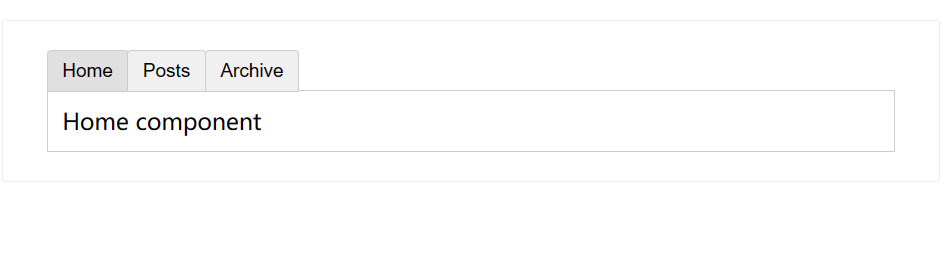
上面的例子是通过 Vue 的 <component> 元素和特殊的 is attribute 实现的:
<!-- currentTab 改变时组件也改变 -->
<component :is="tabs[currentTab]"></component>
2
在上面的例子中,被传给 :is 的值可以是以下几种:
- 被注册的组件名
- 导入的组件对象
你也可以使用 is attribute 来创建一般的 HTML 元素。
当使用 <component :is="..."> 来在多个组件间作切换时,被切换掉的组件会被卸载。我们可以通过 `` 组件 (opens new window)强制被切换掉的组件仍然保持“存活”的状态。
# 2.组件注册
# 2.1 全局注册# (opens new window)
例如组件使用频率非常高(table,Input,button,等)这些组件 几乎每个页面都在使用便可以封装成全局组件
我们可以使用 Vue 应用实例 (opens new window)的 app.component() 方法,让组件在当前 Vue 应用中全局可用。
import { createApp } from 'vue'

const app = createApp({})

app.component(
  // 注册的名字
  'MyComponent',
  // 组件的实现
  {
    /* ... */
  }
)
2
3
4
5
6
7
8
9
10
11
12
如果使用单文件组件,你可以注册被导入的 .vue 文件:
import MyComponent from './test.vue'

app.component('MyComponent', MyComponent)
2
3
app.component() 方法可以被链式调用:
app
  .component('ComponentA', ComponentA)
  .component('ComponentB', ComponentB)
  .component('ComponentC', ComponentC)
2
3
4
全局注册的组件可以在此应用的任意组件的模板中使用:
<!-- 这在当前应用的任意组件中都可用 -->
<ComponentA/>
<ComponentB/>
<ComponentC/>
2
3
4
所有的子组件也可以使用全局注册的组件,这意味着这三个组件也都可以在彼此内部使用。
# 2.2 局部注册# (opens new window)
全局注册虽然很方便,但有以下几个问题:
- 全局注册,但并没有被使用的组件无法在生产打包时被自动移除 (也叫“tree-shaking”)。如果你全局注册了一个组件,即使它并没有被实际使用,它仍然会出现在打包后的 JS 文件中。
- 全局注册在大型项目中使项目的依赖关系变得不那么明确。在父组件中使用子组件时,不太容易定位子组件的实现。和使用过多的全局变量一样,这可能会影响应用长期的可维护性。
相比之下,局部注册的组件需要在使用它的父组件中显式导入,并且只能在该父组件中使用。它的优点是使组件之间的依赖关系更加明确,并且对 tree-shaking 更加友好。
在使用 <script setup> 的单文件组件中,导入的组件可以直接在模板中使用,无需注册:
<script setup>
import ComponentA from './ComponentA.vue'
</script>

<template>
  <ComponentA />
</template>
2
3
4
5
6
7
如果没有使用 <script setup>,则需要使用 components 选项来显式注册:
import ComponentA from './ComponentA.js'

export default {
  components: {
    ComponentA
  },
  setup() {
    // ...
  }
}
2
3
4
5
6
7
8
9
10
对于每个 components 对象里的属性,它们的 key 名就是注册的组件名,而值就是相应组件的实现。上面的例子中使用的是 ES2015 的缩写语法,等价于:
export default {
  components: {
    ComponentA: ComponentA
  }
  // ...
}
2
3
4
5
6
请注意:局部注册的组件在后代组件中并*不*可用。在这个例子中,ComponentA 注册后仅在当前组件可用,而在任何的子组件或更深层的子组件中都不可用。
# 2.3 组件名格式# (opens new window)
在整个指引中,我们都使用 PascalCase 作为组件名的注册格式,这是因为:
- PascalCase 是合法的 JavaScript 标识符。这使得在 JavaScript 中导入和注册组件都很容易,同时 IDE 也能提供较好的自动补全。
<PascalCase />在模板中更明显地表明了这是一个 Vue 组件,而不是原生 HTML 元素。同时也能够将 Vue 组件和自定义元素 (web components) 区分开来。
在单文件组件和内联字符串模板中,我们都推荐这样做。但是,PascalCase 的标签名在 DOM 模板中是不可用的,详情参见 DOM 模板解析注意事项 (opens new window)。
为了方便,Vue 支持将模板中使用 kebab-case 的标签解析为使用 PascalCase 注册的组件。这意味着一个以 MyComponent 为名注册的组件,在模板中可以通过 <MyComponent> 或 <my-component> 引用。这让我们能够使用同样的 JavaScript 组件注册代码来配合不同来源的模板。