
 GridBagLayout(网格袋布局)
# 1. 布局: GridBagLayout
官方JavaDocsApi: java.awt.GridBagLayout (opens new window)
GridBagLayout,网格袋布局管理器。它不要求组件的大小相同便可以将组件垂直、水平或沿它们的基线对齐。每个 GridBagLayout 对象维持一个动态的矩形单元格(动态计算出单个单元格的大小),每个组件占用一个或多个的单元格,该单元格被称为显示区域。每个组件显示区域按从左到右,从上到下,依次排列。
# 2. 约束: GridBagConstraints
GridBagConstraints,封装了若干对组件的约束属性,每个由 GridBagLayout 管理的组件都关联一个该约束实例,以指定组件所在显示区域的具体放置位置,以及组件在其显示区域中的对齐方式。
给组件添加约束: GridBagLayout.setConstraints(Component comp, GridBagConstraints c)
PS: 要理解组件(所在)显示区域(一个或多个单元格组成)和组件在其显示区域中的对齐方式这两个不同的概念。
# 3. 属性: GridBagConstraints 的属性
下面属性描述中的相关大写字母常量均定义在GridBagConstraints类中。
# 3.1 显示区域约束属性
组件的显示区域相关约束属性,直接作用在组件所在显示区域上。
(1)gridx, gridy
组件显示区域开始显示的位置(单元格坐标),容器左上角第一个单元格位置为 (0, 0),默认值为RELATIVE,表示放置在“上一个组件”(所在行列最后添加的一个组件)的“后面”。
(2)gridwidth, gridheight
组件显示区域 水平/竖直方向 所占单元格的个数,默认值为 1,如要占多行/列,需整体结果有足够的行/列。有如下两个常量特殊值可选:
- REMAINDER: 占完所在行/列余下所有单元格(该值可实现 换行 作用);
- RELATIVE: 占到所在行/列余下的倒数第二个单元格(使用该值,所在行/列的最后一个单元格需要“合理”安排组件,并手动换行)。
设置该值不能导致 “前面” 或 “后面” 单元格有留空白,否则可能无效。
(3)weightx, weighty
如何分布额外空间(单元格区域外,容器边缘内 的间隔),当指定行/列中的其中任意一个组件的权重(大于0),则该行/列将(和其他行/列按权重比例)分配额外的水平/竖直空间。当权重为 0(默认值)时,则整个单元格区域居中于容器中心。
PS: 如果调用了java.awt.Window.pack()方法,该值无效,因为 pack 后已无额外的空间。
# 3.2 组件 约束属性
组件相关约束属性,直接作用在组件上。
(1)fill
当显示区域大小大于组件所需要的大小时,组件在其显示区域内的填充方式。可能的值如下:
- NONE: (默认)不调整组件大小;
- HORIZONTAL: 加宽组件,使它在水平方向上填满其显示区域,但是不改变高度;
- VERTICAL: 加高组件,使它在垂直方向上填满其显示区域,但是不改变宽度;
- BOTH: 使组件完全填满其显示区域。
(2)anchor
组件在显示区域内的位置(对齐方式),可能有如下三种值:
| 绝对值 | 相对于方向的值 | 相对于基线的值 |
|---|---|---|
| NORTH | PAGE_START | BASELINE |
| SOUTH | PAGE_END | BASELINE_LEADING |
| WEST | LINE_START | BASELINE_TRAILING |
| EAST | LINE_END | ABOVE_BASELINE |
| NORTHWEST | FIRST_LINE_START | ABOVE_BASELINE_LEADING |
| NORTHEAST | FIRST_LINE_END | ABOVE_BASELINE_TRAILING |
| SOUTHWEST | LAST_LINE_START | BELOW_BASELINE |
| SOUTHEAST | LAST_LINE_END | BELOW_BASELINE_LEADING |
| CENTER(默认值) | BELOW_BASELINE_TRAILING |
(3)ipadx, ipady
组件的内部填充(可看做是组件的内边距),即对组件最小大小的添加量。组件的宽度至少为其最小宽度/高度加上 ipadx/ipady 像素。
(4)insets
组件的外部填充(可看做是组件的外边距,也可看做是显示区域的内边距),即组件与其显示区域边缘之间间距的最小量。
PS: 上面各属性值之间,以及其他因素,有可能存在冲突或不兼容,不一定设置了即有效,建议多做实验,多写测试Demo去尝试。
# 4. 案例: GridBagLayout使用实例
先展示效果,如下图所示:
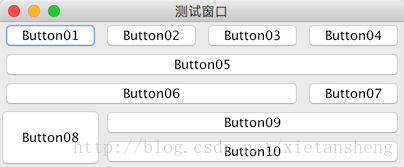
各按钮约束参数:
Button01, Button02, Button03:默认
Button04:gridwidth = REMAINDER、fill = BOTH
Button05:gridwidth = REMAINDER、fill = BOTH
Button06:gridwidth = RELATIVE、fill = BOTH
Button07:gridwidth = REMAINDER
Button08:gridheight = 2、fill = BOTH
Button09:gridwidth = REMAINDER、fill = BOTH
Button10:gridwidth = REMAINDER、fill = BOTH\
代码实现:
package com.xiets.swing;

import javax.swing.*;
import java.awt.*;

public class Main {

    public static void main(String[] args) {
        JFrame jf = new JFrame("测试窗口");
        jf.setDefaultCloseOperation(WindowConstants.EXIT_ON_CLOSE);

        GridBagLayout gridBag = new GridBagLayout();    // 布局管理器
        GridBagConstraints c = null;                    // 约束

        JPanel panel = new JPanel(gridBag);

        JButton btn01 = new JButton("Button01");
        JButton btn02 = new JButton("Button02");
        JButton btn03 = new JButton("Button03");
        JButton btn04 = new JButton("Button04");
        JButton btn05 = new JButton("Button05");
        JButton btn06 = new JButton("Button06");
        JButton btn07 = new JButton("Button07");
        JButton btn08 = new JButton("Button08");
        JButton btn09 = new JButton("Button09");
        JButton btn10 = new JButton("Button10");

        /* 添加 组件 和 约束 到 布局管理器 */
        // Button01
        c = new GridBagConstraints();
        gridBag.addLayoutComponent(btn01, c); // 内部使用的仅是 c 的副本

        // Button02
        c = new GridBagConstraints();
        gridBag.addLayoutComponent(btn02, c);

        // Button03
        c = new GridBagConstraints();
        gridBag.addLayoutComponent(btn03, c);

        // Button04 显示区域占满当前行剩余空间(换行),组件填充显示区域
        c = new GridBagConstraints();
        c.gridwidth = GridBagConstraints.REMAINDER;
        c.fill = GridBagConstraints.BOTH;
        gridBag.addLayoutComponent(btn04, c);

        // Button05 显示区域独占一行(换行),组件填充显示区域
        c = new GridBagConstraints();
        c.gridwidth = GridBagConstraints.REMAINDER;
        c.fill = GridBagConstraints.BOTH;
        gridBag.addLayoutComponent(btn05, c);

        // Button06 显示区域占到当前尾倒车第二个单元格(下一个组件后需要手动换行),组件填充显示区域
        c = new GridBagConstraints();
        c.gridwidth = GridBagConstraints.RELATIVE;
        c.fill = GridBagConstraints.BOTH;
        gridBag.addLayoutComponent(btn06, c);

        // Button07 放置在当前行最后一个单元格(换行)
        c = new GridBagConstraints();
        c.gridwidth = GridBagConstraints.REMAINDER;
        gridBag.addLayoutComponent(btn07, c);

        // Button08 显示区域占两列,组件填充显示区域
        c = new GridBagConstraints();
        c.gridheight = 2;
        c.fill = GridBagConstraints.BOTH;
        gridBag.addLayoutComponent(btn08, c);

        // Button09 显示区域占满当前行剩余空间(换行),组件填充显示区域
        c = new GridBagConstraints();
        c.gridwidth = GridBagConstraints.REMAINDER;
        c.fill = GridBagConstraints.BOTH;
        gridBag.addLayoutComponent(btn09, c);

        // Button10 显示区域占满当前行剩余空间(换行),组件填充显示区域
        c = new GridBagConstraints();
        c.gridwidth = GridBagConstraints.REMAINDER;
        c.fill = GridBagConstraints.BOTH;
        gridBag.addLayoutComponent(btn10, c);

        /* 添加 组件 到 内容面板 */
        panel.add(btn01);
        panel.add(btn02);
        panel.add(btn03);
        panel.add(btn04);
        panel.add(btn05);
        panel.add(btn06);
        panel.add(btn07);
        panel.add(btn08);
        panel.add(btn09);
        panel.add(btn10);

        jf.setContentPane(panel);
        jf.pack();
        jf.setLocationRelativeTo(null);
        jf.setVisible(true);
    }

}
2
3
4
5
6
7
8
9
10
11
12
13
14
15
16
17
18
19
20
21
22
23
24
25
26
27
28
29
30
31
32
33
34
35
36
37
38
39
40
41
42
43
44
45
46
47
48
49
50
51
52
53
54
55
56
57
58
59
60
61
62
63
64
65
66
67
68
69
70
71
72
73
74
75
76
77
78
79
80
81
82
83
84
85
86
87
88
89
90
91
92
93
94
95
96
97
98
99
100