
 docker安装firecrawl并使用
# docker安装firecrawl并使用
# 安装
- 将代码拉取到本地,仓库地址:https://github.com/mendableai/firecrawl
/firecrawl/apps/api目录下的配置拷贝一份cp .env.example .env- 返回根目录,运行
docker-compose up -d
# API使用
api文档地址:https://docs.firecrawl.dev/introduction
- Scrape:Turn any url into clean data,这个用得最多
- Batch Scrape:Batch scrape multiple URLs,可以传多个url
- Crawl:Used to crawl a URL and all accessible subpages. This submits a crawl job and returns a job ID to check the status of the crawl.这个是抓取页面及子页面,返回jobid,然后用get请求去查询这个job
- Map:Used to map a URL and get urls of the website. This returns most links present on the website.返回这个链接中的其他链接,返回页面的结构。
# scrape
curl --request POST \
  --url http://127.0.0.1:3002/v1/scrape \
  --header 'content-type: application/json' \
  --data '{
  "url": "https://juejin.cn/post/7413964058788216869",
  "headers": {
            "Authorization": "Bearer your_access_token_here",
            "X-Custom-Auth": "custom_auth_value"
        }
}'
1
2
3
4
5
6
7
8
9
10
2
3
4
5
6
7
8
9
10
没有请求头的可以不设置Authorization,支持的格式有Available options:
markdown,html,rawHtml,links,screenshot,screenshot@fullPage,json,changeTracking
# Batch Scrape
curl --request POST \
  --url https://127.0.0.1:3002/v1/batch/scrape \
  --header 'Authorization: Bearer <token>' \
  --header 'Content-Type: application/json' \
  --data '{
  "urls": [
    "<string>"
  ]
}'
1
2
3
4
5
6
7
8
9
2
3
4
5
6
7
8
9
# Crawl
curl --request POST \
  --url http://127.0.0.1:3002/v1/crawl \
  --header 'content-type: application/json' \
  --data '{
  "url": "https://juejin.cn",
  "limit": 10,
  "scrapeOptions":
  {
    "format": ["markdown"]
  }
}'
1
2
3
4
5
6
7
8
9
10
11
2
3
4
5
6
7
8
9
10
11
# Map
curl --request POST \
  --url https://127.0.0.1:3002/v1/map \
  --header 'Authorization: Bearer <token>' \
  --header 'Content-Type: application/json' \
  --data '{
  "url": "<string>",
  "search": "<string>",
  "ignoreSitemap": true,
  "sitemapOnly": false,
  "includeSubdomains": false,
  "limit": 5000,
  "timeout": 123
}'
1
2
3
4
5
6
7
8
9
10
11
12
13
2
3
4
5
6
7
8
9
10
11
12
13
# 结合MCP使用
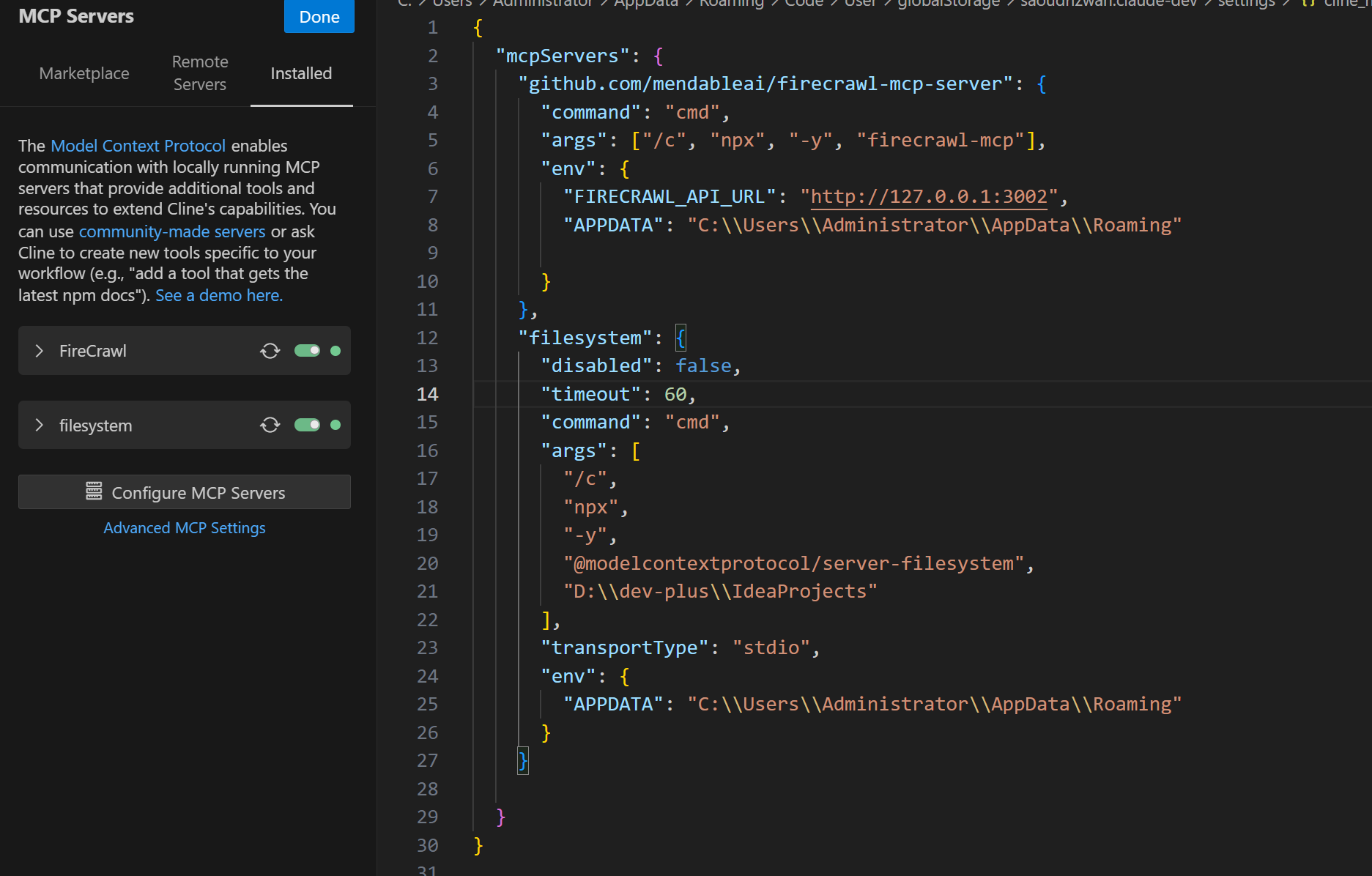
- 安装Firecrawl mcpServers,地址:https://github.com/mendableai/firecrawl-mcp-server/tree/main
- 手动安装:
npm install -g firecrawl-mcp - cline中配置使用mcp
{
  "mcpServers": {
    "mcp-server-firecrawl": {
      "command": "npx",
      "args": ["-y", "firecrawl-mcp"],
      "env": {
        "FIRECRAWL_API_KEY": "YOUR_API_KEY_HERE"
      }
    }
  }
}
1
2
3
4
5
6
7
8
9
10
11
2
3
4
5
6
7
8
9
10
11
注意:本地部署firecrawl的话,不用配置FIRECRAWL_API_KEY,需要FIRECRAWL_API_URL
上次更新: 2025-05-22 06:40:28